
Is a Projector a Practical Alternative to a TV at Home?
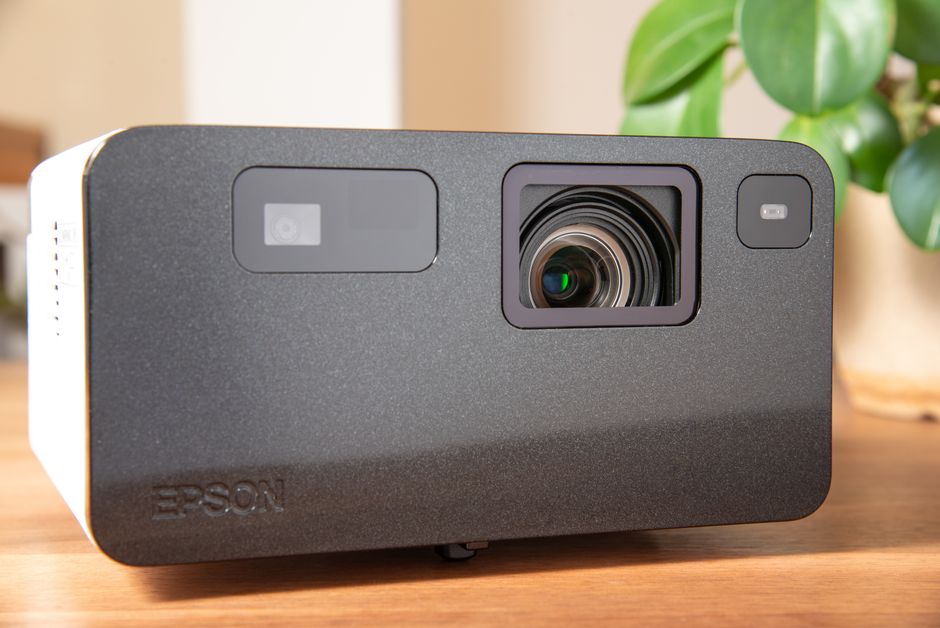
A projector can replace a TV for everyday home viewing if you can control room light, place the projector at the distance its lens needs, and accept more setup and maintenance. It is strongest for large, cinema-style images in a dim room. A TV is usually easier to use and keeps a brighter, more consistent picture in daylight.
What is a good alternative to a TV screen at home?
A projector is a good alternative when you want a much larger picture than a typical television can offer and have a suitable wall or screen. It can make sense for movie fans, renters who want a screen they can put away, or small-space households that do not want a large permanent display. The trade is clear: more image size, less plug-and-play convenience.
Digital Trends compares projectors that commonly create images around 100 to 120 inches or larger with large 85-inch TVs, and notes projection can offer more image size per dollar. ProjectorCentral likewise describes projection as a cost-effective route to a 100-inch-or-larger image. Those sizes sound compelling, but the room has to support the image: you need a usable surface, a sensible viewing distance, and enough space for the projector’s lens geometry.
Start with the wall-to-projector measurement, not the advertised diagonal. As ProjectorCentral advises, the required throw distance depends on both the projector lens and the image size; measure the intended lens-to-screen distance and check it with a throw-distance calculator before selecting a model. A projector that cannot be placed at the required distance will not fit the plan, no matter how appealing its maximum screen size looks.
A plain wall can be a low-commitment starting point. BenQ says a flat, smooth white wall can provide a decent image, while a dedicated screen can improve contrast and color presentation. A fixed-frame screen gives you a flat, consistent surface but takes up wall space; pull-down and portable screens keep the arrangement more flexible. Screen size also needs to suit the room—bigger is not automatically more comfortable.
Can a projector replace a TV for everyday watching?
Yes, a projector can handle regular viewing, but it replaces a TV well only when its convenience gaps are acceptable to you. Think through the daily routine: where the picture appears, how you start streaming, how you hear dialogue, and whether you want to darken the room every time. If those steps feel like friction, a television is likely the better everyday screen.
Projectors and TVs solve different problems. A projector spreads its light across a large image and then reflects it from a surface, so the final picture depends on more than the output number printed on the box. Expert Reviews explains that light loses brightness through the projector’s imaging system and lens, then again in practical terms as it is spread over a larger picture. It also advises checking whether a brightness specification uses ANSI or ISO lumens, because measurements may not be directly comparable.
Then account for what comes with the device. Digital Trends identifies smart features, built-in audio, installation, and convenience as trade-offs in the projector-versus-TV decision. Some projectors have streaming apps and speakers; others need a streaming stick or box and separate audio. Samsung’s example model includes smart-TV streaming apps, HDMI and Bluetooth support, and 40-watt 4.2-channel built-in audio—but those features belong to that model, not to projectors as a category. Verify each item on the model you are considering.
Maintenance is another everyday distinction. ProjectorCentral says many lamp-based projectors are rated around 4,000 hours in brightest mode before the lamp reaches half its original brightness, and recommends checking replacement cost. Digital Trends notes that lamp models lose brightness over time and eventually need a replacement, while laser models avoid lamp replacement but are still not as bright as TVs. Check the light source and its maintenance requirements before treating the purchase price as the full cost.
Can I use a projector in a bright living room, or does the room need to be dark?
A projector works best in a dark room; bright daylight or room lighting washes out perceived contrast and color. You can improve performance in a brighter living room, but you should expect a compromise rather than a TV-like image in every lighting condition. If you cannot dim the room and want vivid daytime viewing, a TV is the more practical choice.
Expert Reviews says around 1,500 lumens or more may be needed for daytime viewing, while emphasizing that the picture still will not match near-dark conditions. Treat that figure as guidance, not a guarantee: brightness ratings use different measurement standards, and the light that reaches your eyes depends on the projector, image size, and screen surface. Digital Trends also cautions that ambient light reduces perceived contrast and that TVs generally maintain a brighter picture in ordinary room lighting.
Match the screen choice to the room. BenQ recommends matte-white screens for dark rooms and ambient-light-rejecting screens for brighter spaces. A high-gain surface can return more light, but it may narrow the viewing angle or create hot spots—uneven bright areas. A screen is not a magic fix for a sunny room; it is one part of a setup whose performance still depends on light control and projector capability.
Use this quick room check before buying:
- Light control: Can you close curtains or dim lights for the viewing you care about most?
- Placement: Can the projector sit at the lens-to-screen distance the model requires?
- Surface: Is there a smooth, appropriately sized wall, or room for a fixed, pull-down, or portable screen?
- Daily setup: Can you place the power and video cables safely and reach the streaming device and audio controls?
- Upkeep: Have you checked whether the projector uses a lamp or laser and what replacement, if any, entails?
Do one practical test before you commit: mark the intended image area, measure the projector position, and imagine watching a normal show with the room lit as it usually is. That separates a movie-night setup from a screen you will actually want to use every day.
Frequently Asked Questions
Can I project onto a plain wall, or do I need a screen?
A flat, smooth white wall can provide a decent image, especially in a dark room. A dedicated screen can improve contrast and color presentation, and its surface affects brightness and viewing angles. Start with the wall if you want to test the setup before committing to a screen.
What else do I need to watch streaming services and hear sound through a projector?
Check the specific model: some projectors include streaming apps and built-in audio, while others need an external streaming device and separate speakers. Confirm the available connections, such as HDMI or Bluetooth, and plan where those devices and cables will go.
What are the biggest downsides of using a projector instead of a TV?
Projectors are more affected by ambient light, usually need more deliberate placement, and can require separate streaming or audio equipment. Lamp models also lose brightness over time and need replacement lamps; laser models avoid that replacement but still may not match a TV’s brightness. Fan noise and startup behavior vary by model, so check product details before choosing.
Before you choose, write down the room’s light conditions, the available throw distance, and which streaming and audio features you need. Then compare a projector that fits those constraints with a TV—not just by screen size, but by the routine you will repeat every day.
Sources
Related guides

How Do I Transfer My Phone Number to an eSIM-Only iPhone?
Move your number to an eSIM-only iPhone with clear setup steps, carrier checks, travel planning, and fixes for common activation failures.

Razr Ultra or Z Flip7: Choose the Right Flip Phone
Choose between the Razr Ultra and Galaxy Z Flip7 by battery, cover-screen apps, durability limits, cameras, and update support.
Smart Ring or Smartwatch: Choose the One You Will Wear
Compare smart rings and Apple Watch for sleep, cycle tracking, recovery, workouts, comfort, and ongoing costs.